Page 2 of 2
Re: Need help with dumping
Posted: Fri Apr 23, 2010 11:34 pm
by velocity37
You'd open Track 2 in the hex editor, but you don't have to do this if you're uncomfortable with it.
In EAC, don't detect gaps, instead leave them undetected. Enter the offset in the drive options as you would normally, and dump the track with test & copy. This will give you track 2 without its pregap.
Use psxt001z.exe to generate your pregap using: psxt001z.exe --gen pregap.bin 352800
Use the command prompt to merge the files, like: copy /b pregap.bin+track02.bin track02good.bin
That will give you your track 2 with a 2 second pregap.
Re: Need help with dumping
Posted: Tue Apr 27, 2010 5:43 pm
by Specialt1212
Thanks for the help your explanation worked for dumping 2 track games

I have another question for you though.
Since EAC won't detect the pregap length we have to determine that manually in IsoBuster, so lets use
Castlevania: Symphony of the Night for our test.
When I open track 2 in IsoBuster and go back 150 sectors I see two full rows of garbage, which is correct but if we pretend this game wasn't already dumped I'm suppose to go back another page to determine if the previous page is full of garbage or just header info correct?
So if I go back another page, I get the following error...
Code: Select all
device reported error code : 03/11/00
I ignored the error and dumped my copy of Castlevania which ended up matching the info in the database exactly.
1. Why would I be getting that error
2. Should I even be going back more than 150 sectors on 2 track discs?
I want to make sure I'm doing this correctly because I have 5 or 6 games that aren't in the database that I want to dump, but I want to make sure I'm doing it correctly.
Re: Need help with dumping
Posted: Tue Apr 27, 2010 9:11 pm
by velocity37
Specialt1212 wrote:1. Why would I be getting that error
2. Should I even be going back more than 150 sectors on 2 track discs?
I want to make sure I'm doing this correctly because I have 5 or 6 games that aren't in the database that I want to dump, but I want to make sure I'm doing it correctly.
1. Some drives will lock up when trying to read the last data sector. My PX-760A does this, but my GH20NS15 can read them like a charm. Thus, the sector it freezes up on is a data sector. Count the sector after that as the first sector of garbage data. If you don't see a sector with garbage data after that sector, it means the combined offset is <= 0, so you can't determine it. When the drive locks up, just eject the drive tray to unfreeze it.
2. Yes, because the track 2 pregap isn't always two seconds. I've recently ran into a couple of discs where the gap was four seconds (300 sectors). If you find the garbage data, you're done, but some discs have strange gaps instead of easy peasy uniform two second gaps.
Re: Need help with dumping
Posted: Thu Apr 29, 2010 8:12 am
by Specialt1212
Thanks for the help, that will allow me to dump another 10 or so PSX games!
So I just found two
really cheap drives that I picked up and installed in my computer (serious about $5 each)
SAMSUNG - DVD-ROM SD-616F with a +1182 offset
PLEXTOR - DVDR PX-708A with a +30 offset
I tried setting them up in EAC per the guide but I'm having a problem when I get to this step
Code: Select all
- Open the drive options (EAC -> Drive Options or press F10);
- Select the first tab ("Extraction Method") and click on "Detect Read Features";
- EAC should now start detecting the features of your drive;
They are both installed properly and working but when I do the above step it shows this message first
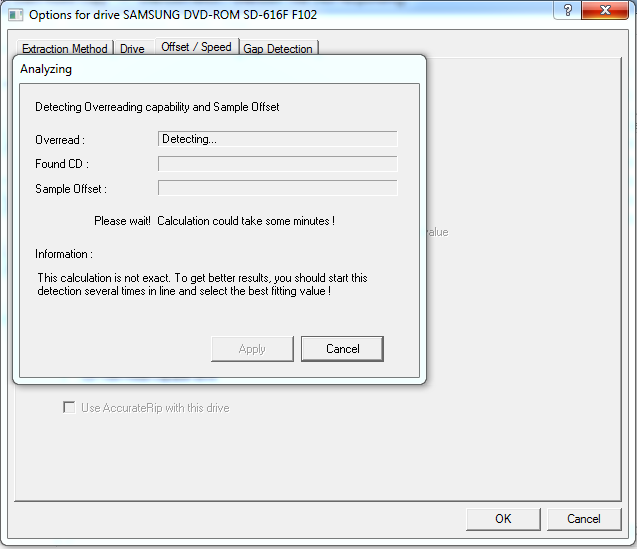
Then is shows this message
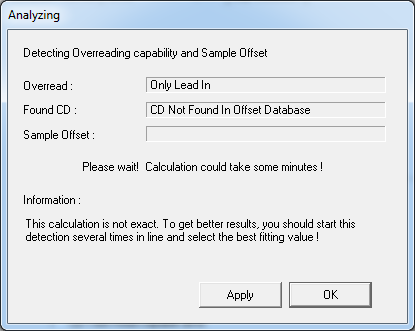
Why does it keep saying that
CD Not Found In Offset Database?
When I set my other two drives up it took a couple of minutes but after it was done analyzing the drive it found the offset sample and asked if I wanted to submit it to the database.
I've tried several video game & music cd's but none seem to work. I even tried two of the discs that are listed on the EAC page.
Can anyone help me set this drive up?
Re: Need help with dumping
Posted: Thu Apr 29, 2010 2:05 pm
by Specialt1212
I've been searching the internet and still can't seem to find a solution to the above problem....
But another
The guide here on Redump.org says I should be using ExactAudioCopy V0.99 Prebeta 4, which I am.
I noticed that
V0.99 prebeta 5 is out now, so should I upgrade? Do you think this may fix the above problem?
Re: Need help with dumping
Posted: Thu Apr 29, 2010 2:57 pm
by RiMMER
Everything's fine, the CD doesn't have to be in the database, in fact, I don't think any CD is. (lol).
You don't have to resolve this.
Re: Need help with dumping
Posted: Thu Apr 29, 2010 3:19 pm
by Rocknroms
Try some well known audio CD, it should be in DB for sure.
About updating EAC, I don't know if the canged anything or if they add new features as I haven't updated it yet.
Re: Need help with dumping
Posted: Thu Apr 29, 2010 6:46 pm
by velocity37
Specialt1212 wrote:I tried setting them up in EAC per the guide but I'm having a problem when I get to this step
Code: Select all
- Open the drive options (EAC -> Drive Options or press F10);
- Select the first tab ("Extraction Method") and click on "Detect Read Features";
- EAC should now start detecting the features of your drive;
In your screenshots, you're in the offset/speed tab, not the extraction method tab. The extraction method tab is where you set it to secure mode, and detect whether your drive has accurate stream, an audio cache, and C2 pointers.
If you're wanting to check the offset of your drive manually, just count the lines of garbage data on an disc you've already dumped.
Also, does that Plextor work with
px_d8? If it does, you'll no longer have to count garbage data, and you can get the offset of data-only discs

Re: Need help with dumping
Posted: Fri Apr 30, 2010 12:12 am
by Specialt1212
Well do I feel like an idiot right about now lol, velocity37 was right I was just on the wrong tab

Thank you all for the suggestions, that corrected the problem. All four of my drives work correctly now.
velocity37 wrote:Also, does that Plextor work with
px_d8? If it does, you'll no longer have to count garbage data, and you can get the offset of data-only discs
Holy crap that is an awesome program and yes my Plextor works with it so feel free to update your post with my drive information PLEXTOR DVDR PX-708A +30
I also tested the following drives and they do not work (an error appeared when I tried to run the file)
- Light Scribe GSA-H55L +102
- TSSTcorp SH-S223L +6
- SAMSUNG DVD-ROM SD-616F +1182
But I'm glad I have one drive that can handle this nifty little program.
Thanks again for all your help guys!